
How MyGymGate Works: A Walkthrough for Gym Owners
How MyGymGate works, step by step: QR check-in on any Android phone, expiry lists, WhatsApp reminders, a TV leaderboard. ₹399/month, unlimited members.
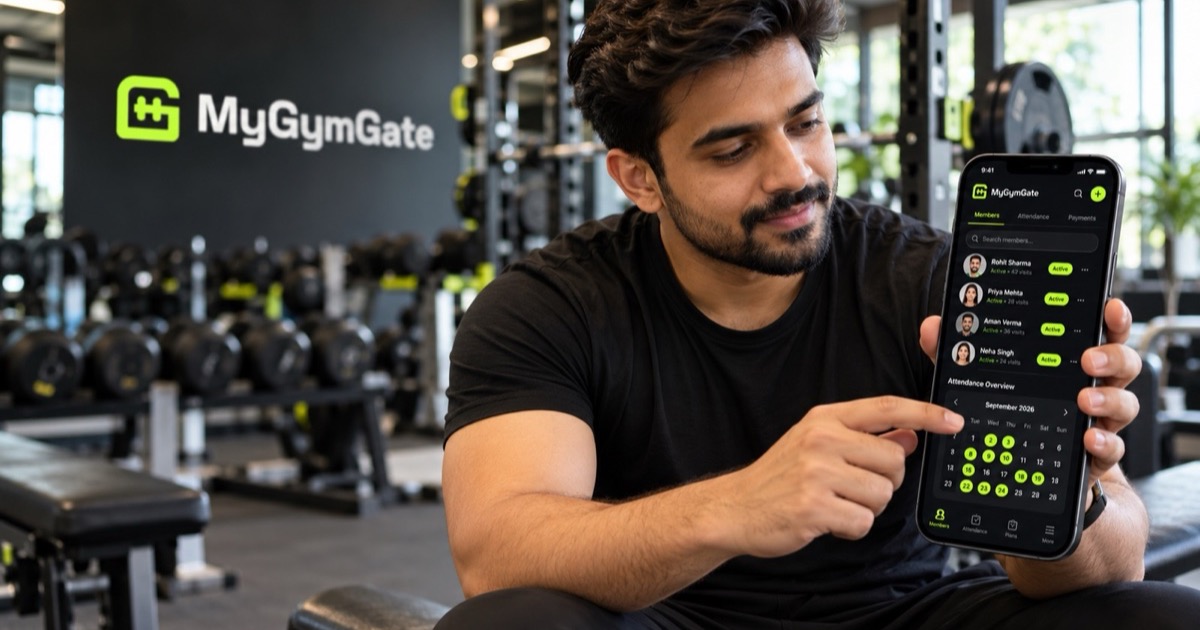
MyGymGate is gym management software for Indian gyms that turns any Android phone into a QR check-in scanner, tracks every member's plan and visits, and helps you renew and win back members through automatic emails, one-tap WhatsApp messages and a live TV leaderboard. It's built for independent gyms, studios and academies, from 30 members to 600, that are tired of the register. It costs ₹399 a month on one plan, with everything included, unlimited members, no setup fee, and free setup and member import.
This page explains exactly how it works, what it doesn't do, and what you need to get started.
What does a day at a gym running MyGymGate look like?
Here's a hypothetical gym, about 200 members, followed through one ordinary day. Every step below is something the product actually does.
6:00 am: members check in at the door
An old Android phone sits on a stand at the entrance. It's been set up as a locked-down scanner, so it does one job only. A member holds up the QR pass from their email (or uses face check-in, if they've agreed to it) and the scanner logs them in about 2 seconds. No signing, no searching through pages.
If someone's plan has expired, the scanner stops them at the door, politely. Nobody at the desk has to have that conversation cold. If mornings get crowded, you can add more scanner phones.
9:00 am: the owner checks the dashboard
From home, the owner opens the Android app (or the web dashboard). It shows:
- Who's inside right now
- Today's visits so far
- Members expiring this week
- Inactive members who've gone quiet
- An attendance calendar showing present and absent by day, with in and out times
That's the whole register, read for you, in one screen.
11:00 am: the expiring list and a WhatsApp tap
Six names are on "expiring this week". The owner taps one, picks a ready renewal template, and WhatsApp opens with the message already filled in and the member's number in place. The owner reads it and presses send. That's it.
This works the same way as WhatsApp's own click to chat feature, so there's no WhatsApp Business API account, approval or per-message charge involved. The trade-off is honest: WhatsApp messages need a human to press send. Automatic renewal and expiry emails, meanwhile, already went out on their own. Timing and wording ideas are in renewal reminders that work.
3:00 pm: a win-back email to quiet members
The owner opens the "win back" screen, which lists members who haven't come in for 2 or more days. They tick the ones worth nudging and send an email. Separately, an automatic "we miss you" email goes out to anyone who's been away longer than the gap the gym chose (anything from 2 to 14 days). Every email carries the gym's name, logo and colours, not ours. For what to say and when, see how to win back inactive members.
7:00 pm: the TV leaderboard during the evening rush
The TV on the wall has a browser open to a short four-letter link (like www.mygymgate.com/abcd). It cycles through 10+ animated screens: the weekly podium, streaks, who's training now, a welcome for new members, birthdays and the monthly board. It updates as people scan in. The TV leaderboard guide covers why this nudges people to show up.
9:30 pm: a member checks their own progress
At home, a member opens their private tracker link. They see their visits, current streak (rest days are allowed, so one day off doesn't wipe it), their plan and their QR pass. No app to install, no password to forget.
How do you set it up?
From first call to first check-in usually takes about a day.
- Book a 15-minute demo. You see the product working with your own plans and prices, and ask whatever you like.
- Send your member list. Excel, a Google Sheet, or even photos of the register pages. Names, plans and end dates are imported for you during setup, free.
- Add your branding. Your logo and colours go on the app, emails, member passes and TV.
- Pair the scanner phone and TV. This is done with you, so you're not left reading a manual.
- Go live. Welcome emails with QR passes go out to members, the TV lights up, and reminders start working from day one.
A practical tip: keep the old register at the desk for the first week as a backup while members get used to showing their pass. If you want a fuller plan for the QR check-in side, that post walks through it.
What hardware do you need?
| Item | Needed? | Notes |
|---|---|---|
| Android phone at the front desk | Yes | Any Android phone works; an old one is fine. Becomes a locked-down scanner |
| Extra scanner phones | Optional | Useful for a second entrance or a busy peak |
| Smart TV or TV stick with a browser | Optional | Only for the live leaderboard |
| Owner's phone | Recommended | For the Android owner app; the web dashboard works in a browser too |
| Biometric machine, RFID cards, printer | No | Not required |
What do members see?
Members never install anything. They get:
- A QR pass by email, which they show at the scanner
- A private tracker link that opens in any browser, showing visits, streak, plan and the QR pass
- Emails in your gym's name: welcome, renewal and expiry reminders, and "we miss you" notes
- Optional face check-in, only with their consent, with matching done on the scanner phone. They can switch it off any time
- Their name on the TV, if they're on a streak, the podium or celebrating a birthday
- Closure or timing-change notices when you send them, with a date and reason, which you can also show on the TV
What do staff see? Owner, staff and scanner roles
There are three kinds of login, so each person sees only what they need.
| Login | Typical user | What it's for |
|---|---|---|
| Owner | You | The full picture: dashboard, members, messaging |
| Staff | Front desk or manager | Day-to-day work, seeing what their role needs |
| Scanner | The front-desk phone | Check-ins only, locked down to that job |
This matters more than it sounds. A scanner phone that can only scan can be left at the door without worry.
What does MyGymGate cost, and what's included?
| Plan detail | What you get |
|---|---|
| Price | ₹399 per month (roughly ₹13 a day) |
| Members | Unlimited |
| Features | Every feature, no add-ons |
| Setup fee | None |
| Setup and member import | Free, including from Excel, Google Sheets or register photos |
| Check-in | QR and optional face check-in, multiple scanner phones |
| Messaging | Automatic emails, WhatsApp and email templates, bulk email to segments |
| Engagement | Streaks, points, live TV leaderboard, member tracker links |
| Access | Owner Android app, web dashboard, staff and scanner logins |
| Contract | Monthly, no long lock-in; annual billing on request |
A quick, labelled example of the maths: if your monthly plan is ₹1,200 and one member renews this month because the reminder reached them on time, that single renewal covers the ₹399 three times over. To see what churn is costing you right now, plug your numbers into the gym churn calculator.
What doesn't MyGymGate do?
Being clear here saves everyone time.
- It doesn't process payments. It isn't a payment gateway and doesn't collect fees. You keep taking cash, UPI or card the way you do now.
- It doesn't send WhatsApp messages automatically. It opens WhatsApp with the message ready; you or your staff press send. Emails are the automatic part.
- The owner app is for Android. There's also a web dashboard in a browser. We don't offer an iPhone owner app.
- It isn't an app for members. That's deliberate. Members use a QR pass and a browser link instead.
- It won't follow up for you. It gives you the expiring and inactive lists and makes messaging one tap. Someone still has to tap.
How does MyGymGate handle data and privacy?
Member data is hosted on Supabase in the Mumbai region (ap-south-1), and each gym can see only its own data. Face check-in is optional, needs each member's consent, and matching happens on the scanner phone.
As the gym, you're still the one collecting your members' personal data, so India's Digital Personal Data Protection Act, 2023 applies to how you ask for consent and use it. Check your own consent wording and notices with a lawyer. The full MyGymGate policy is on the privacy page.
How does it compare with what you use now?
| Task | Paper register | Excel | MyGymGate |
|---|---|---|---|
| Record a check-in | Member writes it | Someone types it later | Scan, about 2 seconds |
| Stop expired members | Depends on the desk | Depends on the desk | Stopped at the scanner |
| Find who's expiring | Read back through pages | Sort by end date | Listed on the dashboard |
| Spot inactive members | Rarely done | Manual formulas | Listed, plus win-back screen |
| Send a renewal reminder | Type each one | Copy and paste | Automatic email, one-tap WhatsApp |
| Member sees own progress | No | No | Private tracker link |
| Cost | Almost nothing | Almost nothing | ₹399 a month |
Quick checklist before your demo
- Your member list in any form (Excel, Sheet or register photos)
- Your plans and prices (monthly, quarterly, annual, PT)
- Your logo, and your gym's colours if you have them
- A spare Android phone for the desk
- Whether you want the TV leaderboard, and which TV or stick it'll run on
- Who on your staff needs a login
Want to see it with your own gym's plans?
If this sounds like how you'd like your front desk to run, book a free 15-minute demo. We'll show MyGymGate working with your plans and prices, and setup and member import are included at no extra cost. If you'd rather look around first, you can download the Android app directly while the Play Store listing is in review.
Useful links
Frequently asked questions
What is MyGymGate and how much does it cost?
MyGymGate is gym management software for Indian gyms that handles QR check-in, renewal reminders, win-back messages, member tracker links and a live TV leaderboard. It costs ₹399 a month on one plan with everything included, unlimited members, no setup fee, and free setup and member import.
Do gym members need to install an app to use MyGymGate?
No. Members get a QR pass by email and a private tracker link that opens in any browser, with no login. Only the owner, staff and the front-desk scanner phone use the app.
Does MyGymGate collect membership fees or send WhatsApp messages automatically?
No. It does not process payments, and it does not send WhatsApp messages by itself. It opens WhatsApp with a ready message filled in, and the owner or staff member presses send. Emails such as welcome, renewal and inactivity reminders do go out automatically.
What hardware does a gym need to run MyGymGate?
Any Android phone for the front desk, and an old one is fine. If you want the leaderboard, add any smart TV or TV stick with a web browser. Nothing else is required.
Where is MyGymGate member data stored?
Data is hosted on Supabase in the Mumbai region, and each gym can see only its own members and records. The full privacy policy is at mygymgate.com/privacy/.