
Gym Management App for Android: Run Your Gym From Your Phone
What a gym management app for Android should do: members, check-ins, expiring and inactive lists, reminders, staff logins, and how to install it safely.
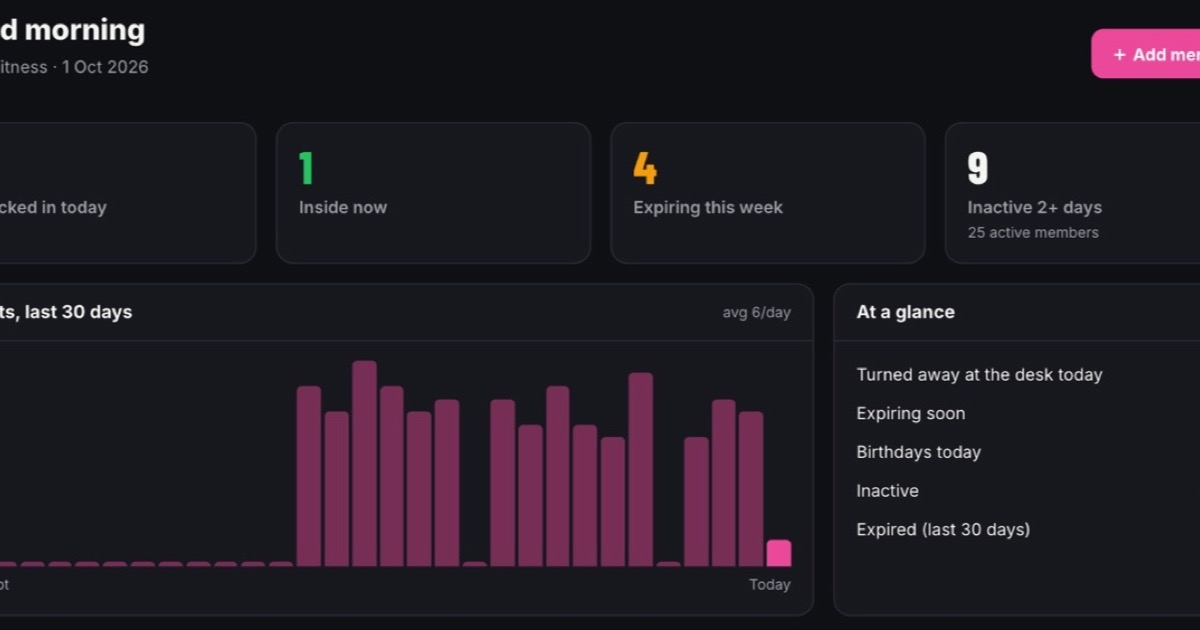
A gym management app lets you run the day-to-day of your gym from your phone: add a member, see who checked in, check who expires this week, find members who have stopped coming, and send them a reminder. On Android, a good one also turns a spare phone into the front-desk check-in scanner. MyGymGate is gym management software for Indian gyms with an owner Android app and a web dashboard that does exactly this, but first, here's what any app should do and how to judge one.
What should a gym management app do on your phone?
Plenty of "apps" are just a website squeezed onto a small screen. A gym management app worth using should let you do these jobs in a few taps, standing up, one-handed.
Members and plans
- Add a new member at the counter in under a minute: name, phone, plan, start date.
- Renew a plan and see the new end date immediately.
- Search by name or phone number, because nobody remembers member IDs.
Check-ins
- See who is inside right now and today's visit count.
- Record check-ins automatically (QR, face, card) instead of someone typing names into a register.
- Stop expired members at the door, so the awkward conversation doesn't land on your receptionist.
Expiring and inactive lists
These two lists are where the money is. "Expiring this week" tells you who to remind before they lapse. "Inactive" tells you who hasn't come in a week or two, which is usually the first sign someone is about to quit. If you want a feel for what losing those members costs, run your own numbers through the gym churn calculator.
Messages
- Ready reminder templates, so you aren't typing the same renewal message 30 times.
- One tap from a member's profile into WhatsApp or email.
- Bulk messages to a segment (everyone expiring, everyone inactive), not just one person at a time.
Attendance calendar
A day-by-day view of each member: present or absent, with in and out times. It settles "I came every day" disputes quickly. Our guide to gym attendance systems compares the ways of capturing this data.
Android app, web dashboard or desktop software: which do you need?
Each has a place. The mistake is buying software where the phone is an afterthought.
| Option | Good for | Weak at |
|---|---|---|
| Android app | Quick actions on the floor, checking numbers from home, sending reminders, the check-in scanner | Long reports, bulk imports, typing lots of data |
| Web dashboard (any browser) | Monthly review, importing members, reading full attendance on a laptop | Not always open when you need it |
| Desktop software on one PC | Works at the counter | Tied to one computer; data lost if the hard disk dies and there's no backup; you can't check from home |
For most single-location gyms, the right setup is an Android app plus a web dashboard that share the same live data. Old-style desktop software installed on the reception PC is the option to move away from. Our broader guide to gym management software in India covers the other features worth checking.
Why does Android matter so much for Indian gyms?
Because that's what almost everyone in India carries. According to StatCounter's India mobile OS figures, Android had about 93.9% of mobile OS share in India in September 2026, and iOS about 6%.
That matters in three ways:
- Your staff use Android. A receptionist or trainer will almost certainly have an Android phone, so a staff login will just work.
- Old phones become hardware. An old Android phone in a drawer can become a dedicated check-in scanner, instead of you buying a biometric machine.
- Members don't need anything special. If members get a QR pass or a link that opens in any browser, it doesn't matter what phone they carry.
What about low-end phones and patchy internet?
Many gyms run on a mid-range phone and a router that gives up at 7 pm. Check these before you commit:
- Minimum Android version. The download page should state it. If your spare phone is older than that, it won't install.
- App size and storage. Keep at least a few GB free on the scanner phone. A phone that's full slows down and crashes.
- Camera quality. QR scanning works fine on modest cameras if the counter is well lit. Face check-in needs a decent front camera and steady lighting.
- What happens when the network drops. Ask the vendor directly. Some apps queue check-ins and sync later, some need a connection. Neither answer is wrong, but you should know which one you're buying, and keep a mobile hotspot as a backup either way.
- Battery. Keep the scanner phone on charge and turn off battery saver for the app.
How do you keep a gym app secure?
Your member list is phone numbers, health notes and payment history. Treat the phone that holds it accordingly.
App permissions
A gym app typically needs the camera (for QR and face scanning) and notifications. Android lets you review these anytime under Settings, then Apps, then the app, then Permissions, as Google explains in its help page on changing app permissions. For camera access you can pick "Allow only while using the app" rather than leaving it on always. If an app asks for your contacts, SMS or call logs and can't explain why, think twice.
Staff logins
Don't share the owner login with your staff. Ever. Give each person their own login with a role: the owner sees everything, a staff member adds members and checks people in, and the scanner phone only scans. When someone leaves, you switch off one login instead of changing your password and telling everyone. The post on what a gym CRM is goes into how roles fit into the wider picture.
The phone itself
Use a screen lock on every phone with the app, keep Android updated, and put the counter phone in the app's kiosk or locked mode.
How do you install a gym app from outside the Play Store safely?
Some gym apps, including newer ones still waiting on Play Store review, are installed as an APK file from the company's website. That's normal, but do it carefully.
Google's own Android help on downloading apps recommends getting apps from Google Play and warns that apps from unknown sources can put your device and data at risk. So the rule is simple: only install from the software company's official website, typed in yourself, never from a file forwarded on WhatsApp or a "free APK" site.
Since Android 8.0, there's no single "unknown sources" switch for the whole phone. Instead, as the Android Developers Blog explained when it launched, you grant the "Install unknown apps" permission to one specific app, such as Chrome. The steps usually look like this:
- Open the vendor's official download page in Chrome and tap download.
- Open the downloaded APK. Android will say the install is blocked and offer a Settings button.
- Turn on Allow from this source for Chrome, then go back.
- Tap Install.
- Afterwards, go to Settings, Apps, Special app access, Install unknown apps, and turn Chrome back off.
Menu names vary a little by phone brand. Google Play Protect still scans apps installed from outside the Play Store and may warn you that it doesn't recognise a new app. For an app from a company you've spoken to and a website you trust, that warning is expected. For anything else, stop.
Register vs Excel on phone vs generic CRM app vs gym-specific app
| Paper register | Excel / Google Sheets on phone | Generic CRM app | Gym-specific app | |
|---|---|---|---|---|
| Recording check-ins | Hand-written | Typed, rarely done | Not built for it | Automatic (QR or face) |
| Expiring this week | Flip pages | Possible with a filter | Possible with setup | Ready list |
| Inactive members | Practically impossible | Hard | Hard | Ready list |
| Reminders | Manual calls | Manual copy-paste | Built for sales, not renewals | Templates, one tap |
| Staff access control | None | Shared file | Yes | Owner, staff, scanner roles |
| Works on a small screen | Not a phone tool | Painful | Varies | Built for it |
| Cost | Very low | Free | Often priced per user | Monthly fee |
A register still works for a very small gym where the owner reads it every week. We wrote a full comparison in paper register vs Excel vs gym software if you're on the fence.
Quick checklist before you pick an app
- Does it run on your oldest spare Android phone?
- Can you see expiring and inactive members in two taps?
- Are check-ins automatic, and are expired members stopped at the door?
- Are there separate owner, staff and scanner logins?
- Are reminder templates ready, in your gym's name?
- Is there a web dashboard for the bigger jobs?
- Is the download from an official site or the Play Store, and is the price clear?
How MyGymGate handles this
MyGymGate has an owner Android app and a web dashboard that share the same data. Here's how it works.
- Install. Download the Android app from our download page (Android 8.0 or newer). The Play Store listing is in review, so for now it's installed from our site, using the steps above. The same app is used by owners, staff and the scanner.
- Set up the front desk. Pair a spare Android phone, even an old one, and it becomes a locked-down scanner. Members show their QR pass, or use optional face check-in with their consent, with matching done on the scanner phone. A check-in takes about 2 seconds, and expired plans are stopped at the door.
- Check the dashboard. On your phone you see who's inside now, today's visits, members expiring this week and inactive members. The attendance calendar shows each member's present and absent days with in and out times.
- Send reminders. Renewal, expiry and "we miss you" emails go out automatically in your gym's name, logo and colours. For WhatsApp, pick a ready template and one tap opens WhatsApp with the message filled in. You press send. There's no Business API to set up, and it doesn't send WhatsApp messages on its own.
- Give staff access. Create owner, staff and scanner logins with roles, so staff only see what you allow.
What it doesn't do: MyGymGate doesn't process payments, and it doesn't send WhatsApp messages automatically. Member data is hosted on Supabase in the Mumbai region, and each gym sees only its own data.
Pricing is one plan: ₹399 a month, unlimited members, everything included, no setup fee. If you're working out whether software pays for itself, the gym profit calculator helps you see your break-even and margins first.
Try it on your own phone
If you'd like to see the app with your own gym's plans, book a free 15-minute demo. We'll set up your account and import your members from Excel, a Google Sheet or even photos of your register, and you can go from first call to first check-in in about a day. You can also download the Android app now and look around before you talk to anyone.
Useful links
Frequently asked questions
Is there a gym management app I can use only on my phone?
Yes. A good gym management app lets you add members, see check-ins, spot expiring and inactive members and send reminders from an Android phone. A web dashboard is still handy for bulk work like importing a member list or reading a full month's attendance on a bigger screen.
Is it safe to install a gym app APK from outside the Play Store?
It can be, if you download it only from the software company's own website, allow installs just for the browser you used, and switch that permission off afterwards. Google Play Protect still checks apps that come from outside the Play Store. Never install a gym app APK forwarded on WhatsApp or found on a random download site.
Can my staff use the gym app without seeing everything?
They should be able to. Look for separate owner, staff and scanner logins with roles, so a trainer or receptionist can check members in or add a new joiner without seeing your full revenue or exporting your member list.
What is MyGymGate and how much does it cost?
MyGymGate is gym management software for Indian gyms, with an owner Android app and a web dashboard for members, QR or face check-in, expiry and inactivity lists, reminders and a TV leaderboard. It costs ₹399 a month on one plan with unlimited members and everything included, with no setup fee and free member import.
Does a gym management app work on a cheap Android phone?
Most do, as long as the phone runs a reasonably recent Android version and has a working camera if you want QR scanning. Check the minimum Android version on the download page, keep some free storage, and use an old phone as the front-desk scanner rather than your personal one.